

How to turn on / turn off / force transmission of a CLCircular device
Before turning on a CLCircular device, press the play button to check its status. Once the device status is confirmed, it can be turned on, turned off, or forced to transmit data
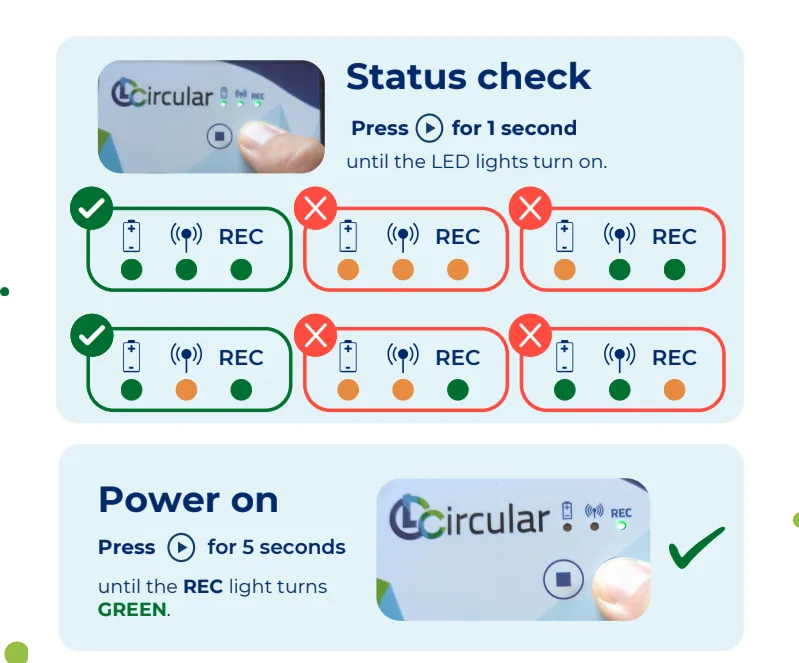
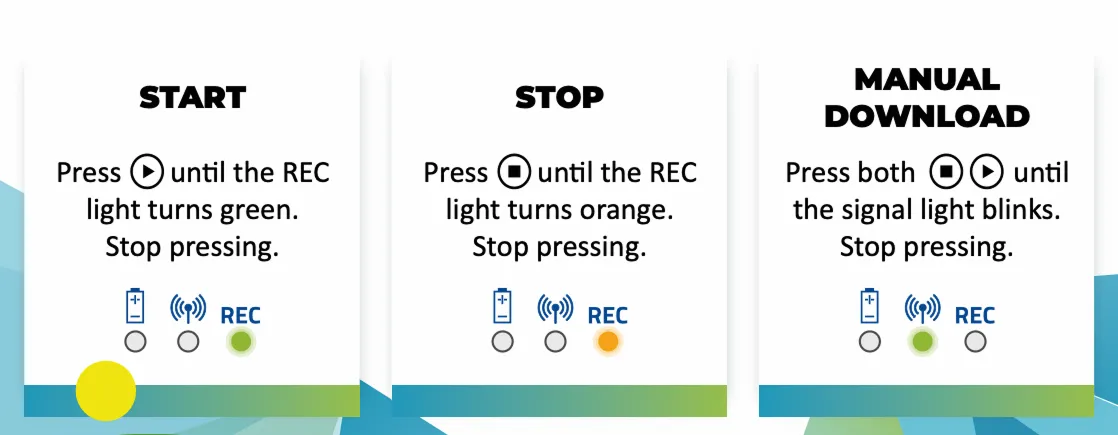
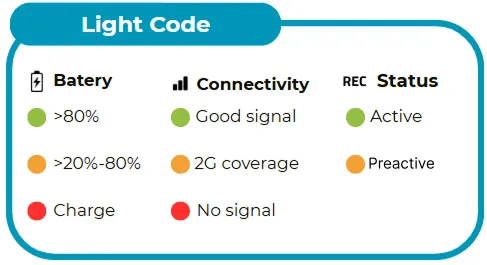
LED lights meaning
By pressing the device’s play button, the LED lights turn on to inform about the device status regarding battery, signal, and state.
Important:
- LED lights do not stay constantly on. The lights turn off a few seconds after checking status, turning on, or turning off.
- The status light blinks when a power-on and/or power-off command is sent.
- If no LED lights turn on when pressing a button, the device has no battery. Proceed to charge it before use.
If the device shows an anomalous light code not explained in this description, for example:
- the lights stay always on
- the lights blink constantly
- you have charged the battery but the lights still don’t turn on
Contact support from the Log